Building a Pluggable Application with FastAPI and React
Learn to build a pluggable application using FastAPI for the backend and React for the frontend, allowing dynamic plugin loading and UI updates.
11 min read • 9/5/2026
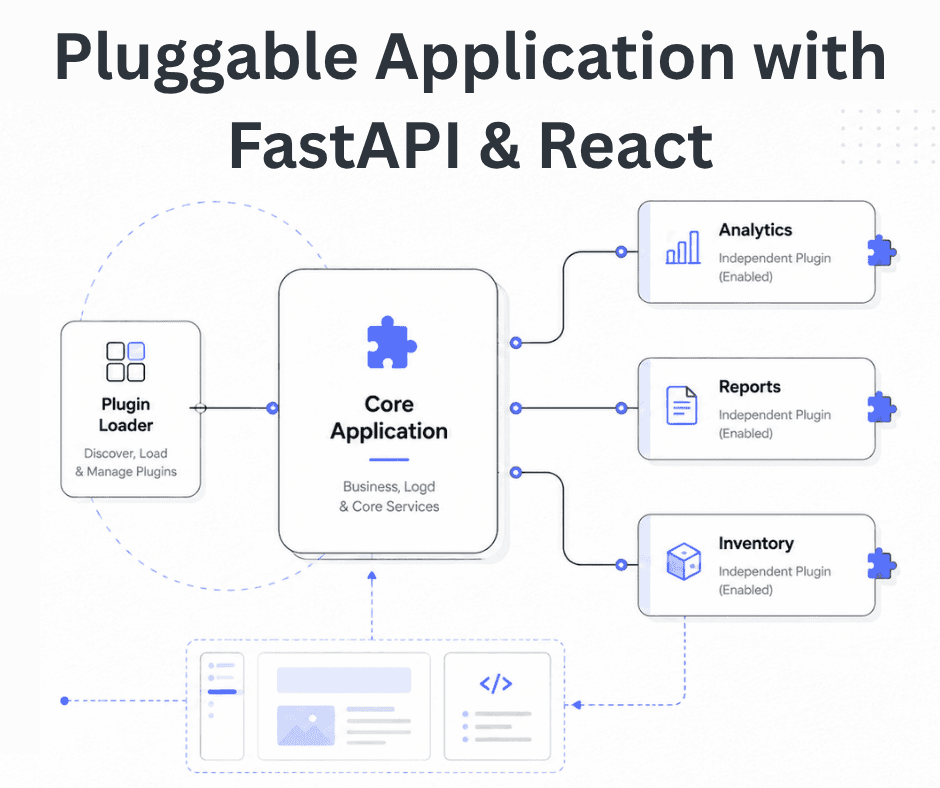
Some applications need a different architectural approach from the traditional way of building web systems. One useful option is pluggable architecture.
The idea is straightforward: instead of putting every feature inside one large codebase, the application is divided into independent modules, or plugins. A small core module handles the essentials—authentication, basic database routing, and plugin loading—while additional functionality can be installed when needed.
This keeps the core system small and makes it easier to add new features without constantly modifying existing code.
Why Pluggable Architecture?
As a traditional monolithic application grows, adding features usually means changing code already used by other parts of the system. That increases the chance of regression bugs and often forces developers to understand a large portion of the application before making what should be a relatively small change.
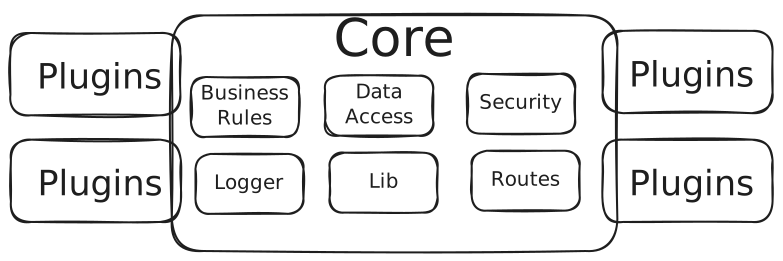
A pluggable architecture takes a different approach. New functionality lives in independent modules, so the core application doesn't need to be modified every time a feature is added.
A few practical benefits stand out:
- Keeps the core clean: You can add a plugin without changing the core application code.
- Simplifies debugging: If a plugin has a problem, the issue can isolate the issue to that plugin instead of affecting unrelated features.
- Speeds up development: Teams can build, test, and release plugins independently of the main application.
For a deeper theoretical look at how pluggable systems communicate and work, see the previous article: Designing Software with a Plug-and-Play Mindset.
In this article, we are going to build a small full-stack pluggable architectural application example using FastAPI for the backend and React for the frontend. The application will accept a plugin as a .zip file, extract it at runtime, dynamically load its API endpoints, and update the React interface based on the plugin's metadata.
High-Level System Flow
Before looking at the implementation, it helps to understand how the two sides communicate.
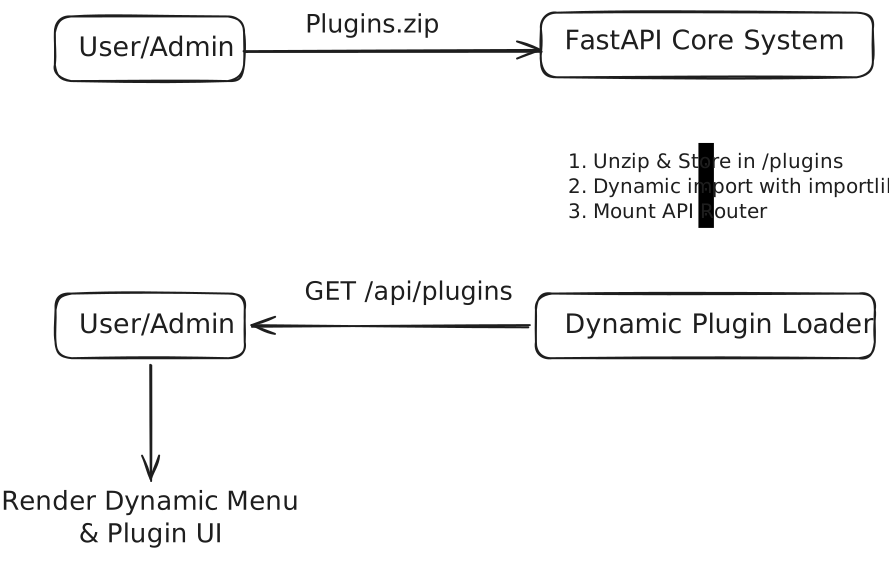
- Backend (FastAPI): The backend exposes an endpoint for uploading
.zipplugin packages. After receiving a package, it extracts the files, reads the plugin metadata, imports the plugin module with Python'simportlib, and mounts itsAPIRouteron the running FastAPI application. - Frontend (React): When the application loads, React requests the list of installed plugins from
/api/plugins. It uses the returned JSON manifests to build the navigation and render the appropriate plugin views.
The Backend: Core System Setup
Let's start with the FastAPI backend.
Folder Structure
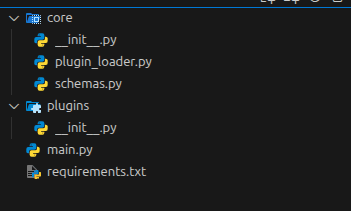
The project keeps the core application separate from the plugins installed later.
Plugin Data Model
Every plugin provides a manifest containing the information the core system needs to identify and load it. The manifest also includes a few hints that the frontend can use to build its interface.
# core/schemas.py

from pydantic import BaseModel
from typing import Optional, Dict, Any


class PluginManifest(BaseModel):
    id: str
    name: str
    version: str
    description: str
    frontend_route: str
    menu_icon: Optional[str] = "extension"
    entry_point: str
Dynamic Plugin Loader
The plugin loader discovers installed plugins, reads their manifests, imports their Python modules, and registers their routers with FastAPI.
# core/plugin_loader.py

import importlib
import io
import json
import re
import shutil
import zipfile
from pathlib import Path, PurePosixPath
from typing import Dict
from fastapi import FastAPI, HTTPException, UploadFile
from core.schemas import PluginManifest

PLUGIN_DIR = Path(__file__).resolve().parent.parent / "plugins"
REGISTERED_PLUGINS: Dict[str, PluginManifest] = {}
LOADED_PLUGIN_IDS: set[str] = set()


def load_plugins(app: FastAPI):
    """Scan installed plugin directories and mount each router once."""
    PLUGIN_DIR.mkdir(parents=True, exist_ok=True)
    for folder_path in PLUGIN_DIR.iterdir():
        manifest_path = folder_path / "manifest.json"
        if not folder_path.is_dir() or not manifest_path.exists():
            continue

        with manifest_path.open("r", encoding="utf-8") as manifest_file:
            manifest = PluginManifest(**json.load(manifest_file))

        if manifest.id in LOADED_PLUGIN_IDS:
            continue

        module_name = (
            f"plugins.{folder_path.name}."
            f"{manifest.entry_point.removesuffix('.py')}"
        )
        plugin_module = importlib.import_module(module_name)

        if hasattr(plugin_module, "router"):
            app.include_router(
                plugin_module.router,
                prefix=f"/api/v1/plugins/{manifest.id}",
                tags=[manifest.name],
            )
            REGISTERED_PLUGINS[manifest.id] = manifest
            LOADED_PLUGIN_IDS.add(manifest.id)
            print(f"[+] Successfully loaded plugin: {manifest.name}")


def handle_plugin_upload(file: UploadFile) -> PluginManifest:
    """Validate and install a flat zip archive into its own plugin directory."""
    PLUGIN_DIR.mkdir(parents=True, exist_ok=True)

    try:
        archive = zipfile.ZipFile(io.BytesIO(file.file.read()))
    except zipfile.BadZipFile as exc:
        raise HTTPException(status_code=400, detail="Invalid plugin archive.") from exc

    with archive:
        files = [item for item in archive.infolist() if not item.is_dir()]
        if any(
            PurePosixPath(item.filename).is_absolute()
            or ".." in PurePosixPath(item.filename).parts
            for item in files
        ):
            raise HTTPException(status_code=400, detail="Archive contains an unsafe path.")

        manifest_entry = next(
            (item for item in files if item.filename == "manifest.json"), None
        )
        if manifest_entry is None:
            raise HTTPException(
                status_code=400,
                detail="Plugin archives must contain manifest.json at their root.",
            )

        try:
            manifest = PluginManifest(
                **json.loads(archive.read(manifest_entry).decode("utf-8"))
            )
        except (UnicodeDecodeError, json.JSONDecodeError, ValueError) as exc:
            raise HTTPException(status_code=400, detail="Plugin manifest is invalid.") from exc

        if not re.fullmatch(r"[A-Za-z_][A-Za-z0-9_]*", manifest.id):
            raise HTTPException(status_code=400, detail="Plugin id is not a valid package name.")
        if manifest.id in REGISTERED_PLUGINS or (PLUGIN_DIR / manifest.id).exists():
            raise HTTPException(status_code=409, detail="A plugin with this id is already installed.")
        if not any(item.filename == manifest.entry_point for item in files):
            raise HTTPException(status_code=400, detail="Plugin entry point is missing from archive.")

        target_dir = PLUGIN_DIR / manifest.id
        target_dir.mkdir()
        try:
            for item in files:
                destination = target_dir / item.filename
                destination.parent.mkdir(parents=True, exist_ok=True)
                with archive.open(item) as source, destination.open("wb") as target:
                    shutil.copyfileobj(source, target)
        except Exception:
            shutil.rmtree(target_dir)
            raise

    return manifest
The core application does not need to know the plugin's implementation details beforehand. It discovers the module from the manifest and loads it at runtime.
Main Application
The Backend API application has two important plugin-related endpoints:
GET /api/pluginsreturns the list of currently registered plugins.POST /api/plugins/uploadaccepts a new.zipplugin module.
# main.py

from fastapi import FastAPI, UploadFile, File, HTTPException
from fastapi.middleware.cors import CORSMiddleware
from contextlib import asynccontextmanager
from core.plugin_loader import (
    load_plugins,
    handle_plugin_upload,
    REGISTERED_PLUGINS,
)
from core.schemas import PluginManifest
from typing import List


@asynccontextmanager
async def lifespan(app: FastAPI):
    # loads the plugins
    load_plugins(app)
    yield


app = FastAPI(title="Pluggable Core Engine", lifespan=lifespan)
app.add_middleware(
    CORSMiddleware,
    allow_origins=["*"],
    allow_credentials=False,
    allow_methods=["*"],
    allow_headers=["*"],
)


@app.get("/api/plugins", response_model=List[PluginManifest])
def get_active_plugins():
    """Returns the list of currently registered plugins."""
    return list(REGISTERED_PLUGINS.values())


@app.post("/api/plugins/upload")
def upload_plugin(file: UploadFile = File(...)):
    """Accepts a .zip plugin package, extracts it, and registers its router."""
    if not file.filename.endswith(".zip"):
        raise HTTPException(status_code=400, detail="Only .zip files are allowed.")

    manifest = handle_plugin_upload(file)
    # Reload to register newly extracted routes
    load_plugins(app)
    return {
        "message": f"{manifest.name} installed successfully!",
        "plugin": manifest,
    }
At startup, the application scans the plugins/ directory and loads any valid plugins it finds. When you upload a new plugin, the archive is extracted, and the loader runs again so the newly installed routes become available.
Creating a Sample FastAPI Plugin
Now let's create a simple Analytics Plugin that can be installed independently from the core application.
Plugin Folder Structure
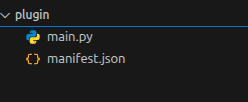
The manifest describes the plugin and tells the loader which Python module contains its router.
// manifest.json
{
  "id": "analytics",
  "name": "Analytics Dashboard",
  "version": "1.0.0",
  "description": "Provides real-time system metric insights.",
  "frontend_route": "/analytics",
  "menu_icon": "chart",
  "entry_point": "main.py"
}
The plugin itself can be very small. It simply defines an APIRouter and exposes its own endpoint.
# main.py

from fastapi import APIRouter

router = APIRouter()


@router.get("/data")
def get_analytics_data():
    """Plugin Related endpoint."""
    # Returning some dummy data for demonstration purposes
    return {
        "metrics": {"total_users": 1250, "active_sessions": 84, "revenue": "$12,430"},
        "chart_data": [12, 19, 3, 5, 2, 3],
    }
Once the files are ready, package the analytics_plugin directory as: analytics_plugin.zip or whatever name you prefer. The zip file should contain the manifest.json and main.py at its root.
You can then upload that archive through the application.
The Frontend: Making React Adaptive
The backend can load plugins dynamically, but the frontend also needs a way to discover them.
Instead of hard-coding every feature into React, the frontend can use a Schema Driven UI approach. FastAPI provides the plugin manifests, and React uses them to build the navigation and routes.
Main Dashboard Shell
The main application fetches the list of installed plugins and creates a navigation item and route for each one.
// App.jsx

import {BrowserRouter, Routes, Route} from "react-router-dom";
import {useCallback, useEffect, useState} from "react";
import Sidebar from "./components/Sidebar";
import DynamicPluginView from "./components/DynamicPluginView";
import PluginUploader from "./components/PluginUploader";

function Dashboard({onPluginInstalled}) {
  return (
    <div>
      <h1>Dashboard</h1>
      <p>Welcome to the application.</p>
      <PluginUploader onInstalled={onPluginInstalled} />
    </div>
  );
}

export default function App() {
  const [plugins, setPlugins] = useState([]);

  const loadPlugins = useCallback(async () => {
    const response = await fetch("http://localhost:8000/api/plugins");
    if (!response.ok) {
      throw new Error("Failed to load plugins");
    }
    setPlugins(await response.json());
  }, []);

  useEffect(() => {
    loadPlugins().catch(console.error);
  }, [loadPlugins]);

  return (
    <BrowserRouter>
      <div className="app">
        <Sidebar plugins={plugins} />
        <main className="content">
          <Routes>
            <Route
              path="/"
              element={<Dashboard onPluginInstalled={loadPlugins} />}
            />

            {plugins?.map((plugin) => (
              <Route
                key={plugin.id}
                path={plugin.frontend_route}
                element={<DynamicPluginView plugin={plugin} />}
              />
            ))}
          </Routes>
        </main>
      </div>
    </BrowserRouter>
  );
}
You don't need to add a new sidebar item manually whenever a plugin is installed. React gets the plugin list from the backend and builds the navigation from that data.
Generic Components
These plugins call the API exposed by the plugin and can also upload plugins.
// components/DynamicPluginView.jsx
import {useEffect, useState} from "react";

export default function DynamicPluginView({plugin}) {
  const [data, setData] = useState(null);
  const [loading, setLoading] = useState(true);
  const [error, setError] = useState(null);
  useEffect(() => {
    async function loadPluginData() {
      try {
        setLoading(true);
        setError(null);
        const response = await fetch(
          `http://localhost:8000/api/v1/plugins/${plugin.id}/data`,
        );
        if (!response.ok) {
          throw new Error("Failed to load plugin");
        }
        const result = await response.json();
        setData(result);
      } catch (err) {
        setError(err.message);
      } finally {
        setLoading(false);
      }
    }
    loadPluginData();
  }, [plugin.id]);

  if (loading) {
    return <p>Loading plugin...</p>;
  }
  if (error) {
    return <p>Error: {error}</p>;
  }

  return (
    <div>
      <h1>{plugin.name}</h1>
      <p>{plugin.description}</p>
      <pre>{JSON.stringify(data, null, 2)}</pre>
    </div>
  );
}// components/PluginUploader.jsx
import {useRef, useState} from "react";
export default function PluginUploader({onInstalled}) {
const inputRef = useRef(null);
const [status, setStatus] = useState({type: "", message: ""});
const [uploading, setUploading] = useState(false);
async function handleSubmit(event) {
event.preventDefault();
const file = inputRef.current?.files?.[0];
if (!file) {
setStatus({type: "error", message: "Choose a plugin .zip file first."});
return;
}
const formData = new FormData();
formData.append("file", file);
setUploading(true);
setStatus({type: "", message: ""});
try {
const response = await fetch(`http://localhost:8000/api/plugins/upload`, {
method: "POST",
body: formData,
});
const payload = await response.json().catch(() => ({}));
if (!response.ok) {
throw new Error(payload.detail || "Plugin upload failed.");
}
await onInstalled();
inputRef.current.value = "";
setStatus({type: "success", message: payload.message});
} catch (error) {
setStatus({type: "error", message: error.message});
} finally {
setUploading(false);
}
}
return (
<section className="plugin-uploader" aria-labelledby="plugin-upload-title">
<h2 id="plugin-upload-title">Install a plugin</h2>
<p>Choose a plugin package (.zip) to add it to the navigation.</p>
<form onSubmit={handleSubmit}>
<label htmlFor="plugin-file">Plugin package</label>
<div className="plugin-upload-controls">
<input
ref={inputRef}
id="plugin-file"
type="file"
accept=".zip,application/zip"
disabled={uploading}
/>
<button type="submit" disabled={uploading}>
{uploading ? "Installing…" : "Upload plugin"}
</button>
</div>
</form>
{status.message && (
<p className={`upload-status ${status.type}`} role="status">
{status.message}
</p>
)}
</section>
);
}// components/Sidebar.jsx
import {Link} from "react-router-dom";
export default function Sidebar({plugins = []}) {
return (
<aside className="sidebar">
<h2>My Application</h2>
<nav>
<Link to="/">Dashboard</Link>
{plugins?.map((plugin) => (
<Link key={plugin.id} to={plugin.frontend_route}>
{" | " + plugin.name}
</Link>
))}
</nav>
</aside>
);
}The frontend does not need to know the internal implementation of the Analytics plugin. It only needs the plugin's ID and metadata to construct the request.
Wiring It Together: The End-to-End Flow
Once the backend and frontend are running, the complete flow looks like this.
Upload the Package
An administrator selects analytics_plugin.zip from the React uploader.
The frontend sends the archive to: POST /api/plugins/upload
Extract and Mount the Plugin
FastAPI receives the archive and extracts it into the plugins/ directory.
For example:
plugins/
└── analytics_plugin/
 ├── manifest.json
 └── main.py
The plugin loader reads the manifest, imports main.py, finds its router, and mounts it under: /api/v1/plugins/analytics
The plugin's /data endpoint therefore becomes: /api/v1/plugins/analytics/data
Update the React UI
After the upload succeeds, React calls: GET /api/plugins
The backend returns the newly registered plugin manifest.
React adds the plugin to the sidebar and creates its frontend route: /analytics
No frontend rebuild is required just to make the new plugin appear in the navigation.
Use the Plugin
The user selects Analytics Dashboard from the sidebar.
React renders the generic plugin view, which requests: GET /api/v1/plugins/analytics/data
The Analytics plugin handles the request and returns its metrics. React then displays the result.
The core application and the plugin remain separate, even though they work together as one system.
Production Considerations and Pitfalls
The example above demonstrates the basic idea, but dynamically loading code introduces several issues that need to be handled before using this architecture in production.
Security
The biggest concern is security. A plugin is executable code. If users or third-party developers can upload plugins, the server cannot simply assume every package is safe. A malicious plugin could potentially read files, access environment variables, connect to internal services, or execute arbitrary commands. For untrusted plugins, isolation is essential. Running each plugin in a Docker container, WebAssembly environment, or restricted non-root process can limit what the plugin can access. Uploaded archives should also be validated before extraction. The application should check their contents, reject unexpected files, enforce size limits, and protect against path traversal attacks.
Dependency Conflicts
Different plugins may require different versions of the same dependency.
For example, one plugin might need pandas==1.5.0, while another depends on pandas==2.2.0. Installing both directly into the same Python environment can quickly become a problem.
A better approach is to isolate plugin dependencies using separate virtual environments or package each plugin as an independent service. For larger systems, plugins can run as containerised services behind a common API gateway.
Database Migrations
Plugins may also need their own database tables and migrations. A plugin should not be allowed to modify core tables without strict controls. Keeping plugin owned tables separate makes the system easier to maintain and reduces the chance that installing or removing a plugin will affect the core application. Migration scripts should also be versioned and executed as part of the plugin installation process rather than being run unthinkingly.
Runtime Failures
A plugin can fail just like any other piece of application code. An unhandled exception, broken dependency, or unexpected input should not bring down the entire host application. Plugin execution should therefore have proper exception handling, logging, and monitoring. Errors should be converted into predictable API responses while keeping the rest of the application available.
Plugin Validation and Versioning
Never treat the manifest as trusted input. Validate fields such as the plugin ID, entry point, route, and version before using them. It is also useful to define compatibility rules between the core application and plugins. As the system evolves, an older plugin may depend on APIs or features that no longer exist in a newer core version. Versioning gives the application a way to determine whether a plugin can be installed and loaded safely.
Avoiding Duplicate Registration
Another issue in the example that matters in a real application is that calling the plugin loader repeatedly can register the same router more than once. A production implementation should keep track of which plugins have already been loaded and avoid registering the same routes repeatedly. It should also have a proper installation and uninstallation lifecycle instead of simply rescanning the directory whenever a package is uploaded.
Conclusion
Pluggable architecture offers a practical method that lies between a large monolithic application and a collection of independent microservices.
With FastAPI's dynamic router registration on the backend and a Schema Driven React frontend, you can package features as independent modules and add them without changing the core application every time.
The example here demonstrates the basic pattern: upload a plugin, extract it, load its router, expose its metadata, and let React build the corresponding interface dynamically.
For systems that need optional modules, customer-specific functionality, internal extensions, or independently developed features, this approach can make a growing application much easier to organise and maintain.
You Might Also Like
 Design & Architecture
Beyond Monoliths: Designing Software with a Plug-and-Play Mindset
In the early days of software development, most companies and developers used monolithic architecture to build systems. It is a traditional approach t
5 min read
 Backend & DevOps
Building and Deploying RustFS: S3 Storage Integration via Docker
Amazon Simple Storage Service (S3) is a popular object storage solution designed to help organizations build scalable, highly available, secure, and p
4 min read
 Backend & DevOps
High Performance Self-Hosted Bucket Storage for Developers
At scale, applications don’t store user-uploaded data such as images, videos, or other binary files directly in the database. Instead, this data is ha
6 min read